
How to Share a CAD Drawing With Clients and Inspectors
Stop versioning chaos in inboxes — send one URL with pan, zoom, layers, and text search for GC, owner, or AHJ review.
Free online tool
Share CAD Drawing Online
Use the tool first, then follow the steps below for detail.
Recommended blogs
In this guide
Introduction
Stop emailing DWG attachments. Generate a view-only link with pan, zoom, layers, and text search included.
Emailing DWG files is how you end up with "Final_v2_REALLY_FINAL.dwg" in six inboxes. A view link gives the GC, owner, or inspector the same pan/zoom/layer view you have, without buying them a CAD seat.
We'll go through how sharing works here and what recipients actually see.
Links beat attachments
Create a link from the viewer after you've confirmed the file opens. Recipients get pan, zoom, layers, and text search no install, no login during our free launch period.
Links expire after 90 days. Good for project turnover; less good if you need a permanent record download or archive what you need before it lapses.
Upload only happens when you share. Opening and reviewing locally doesn't send the file to our servers, which matters on bid work and healthcare jobs with strict IT rules.
Collaboration without CAD seats
Owners, inspectors, and overseas partners open the same interactive view you see no software install.
Where this shows up on a real job
Foreman on site gets Rev 3 on a phone and needs to confirm head count on Level 2 before Monday's walkthrough open the DWG, run share CAD drawing online, no trip back to the trailer PC with the only AutoCAD license.
Owner rep during tenant improvement doesn't own CAD but needs to see alarm device layout share link or walk them through the viewer in a meeting.
BIM coordinator gets consultant DWG Friday at 4pm; Revit import is Monday. Validate or convert over the weekend in the browser instead of waiting for IT to install TrueView.
Commissioning agent building a tag list for sign-off extract text once, filter in Excel, attach to the report.
Plan reviewer comparing two revisions side by side same tool, two browser tabs, or export between steps if your process requires saved files.
Field notes
Test the link in an incognito window before you send it to the owner. Confirms they won't hit a login wall.
Put the link in the meeting invite body, not only chat chat scrolls away, email stays findable.
For multi-building campuses, share one floor at a time if the combined file is huge. Less load time on their phone.
Write one sentence in the email about what they're looking at "Level 2 sprinkler layout, Rev 4" so they don't open the link cold and panic at a blank layer list.
Step by step
The tool page has a live workspace at the top same engine as the full viewer. Upload there or use Upload DWG in the header if you want the whole screen.
Free launch limit is 15 MB per file. That's most single-floor fire plans. Campus packs may need to be split by sheet annoying, but still faster than shipping drives.
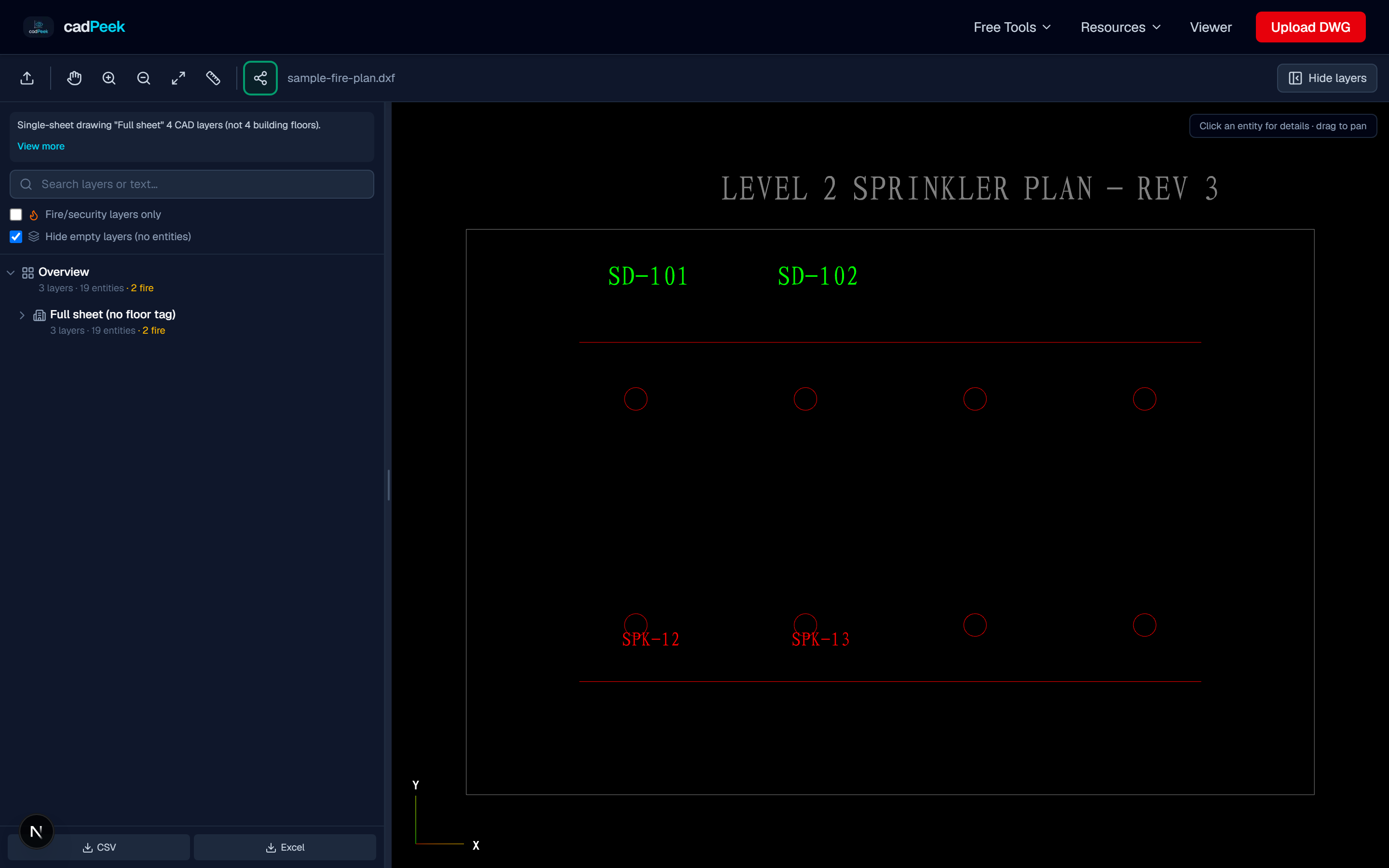
- Upload drawing: Open in viewer first.
- Click Share: Creates hosted link.
- Send URL: Valid 90 days.
File prep checklist
Confirm the attachment opens corrupt zips and truncated downloads happen on mobile hotspots.
Note the AutoCAD version if the inspector asks; file inspector shows it without opening desktop software.
If xref paths are broken, you may see empty sheets until the sender binds xrefs. Browser viewers can't fix missing xref files on your machine.
For share CAD drawing online, work on a copy if your contract requires preserving the received file byte-for-byte in the project folder.
After you're done, archive what you exported (DXF, Excel, report text) next to the share link URL in your project log. Future you will forget which link was which.
If the GC asks "can you send that again?" you already know which revision you processed your filename discipline pays off here.
When in doubt, call the engineer before you re-export. Five minutes on the phone beats a wrong file in the record set.
Things that still bite you
Tianzheng and some plugin DWGs open partial in any web viewer, not just ours. If the sheet looks empty or blocks won't explode, ask for standard DWG/DXF from AutoCAD we've seen that more on imports from overseas consultants than domestic shops.
Always check units before measuring. We've seen metric files opened with feet assumed and spacing "violations" that were just a units mistake.
Keep the sender's original filename when you export. "ProjectX_from_MEP_rev2.dxf" beats "download(1).dxf" when the engineer calls back asking which file you used.
Custom objects may flatten to lines and arcs on export. Most fire plans are 2D lines, blocks, and text that's fine. Weird MEP solids might not convert cleanly.
Sharing is upload-by-choice. If the drawing is sensitive, review locally and only share redacted sheets or specific floors.
Recipients on corporate networks sometimes block new domains if the link fails, try from a phone on LTE to see if it's their firewall.
Do you still need AutoCAD?
Yes, if you're editing geometry moving heads, rerouting pipe, updating the model. No, if you're reviewing, converting, counting, measuring, or sending a link to someone who will never edit.
Autodesk's web viewer needs an account and uploads to their cloud. DWG TrueView is free but Windows-only and a chunky install. CadPeek is aimed at fire plan review: layer filters, block counts, text export, measure without a monthly seat for every person who touches the drawing.
Lots of shops keep a few AutoCAD licenses for production and use browser tools for everyone else in the chain.
Quick answers
Is share CAD drawing online free right now?
Yes no account needed during launch. There's a per-file size cap; see the tool page for the current limit.
Bottom line
Stop emailing DWG attachments. Generate a view-only link with pan, zoom, layers, and text search included.
Open the Share CAD Drawing Online tool page, drop in your DWG or DXF, and run it. If the file won't open cleanly, try the file inspector or DXF validator first saves time versus debugging a bad attachment downstream.
Bookmark the page if you get repeat work from the same GC or engineer. The related tools in the sidebar cover layer audit, text export, and share links when this job turns into the next one.
Standard US sprinkler and alarm sheets from mainstream consultants usually open fine. Weird plugin files are the exception and those are painful in desktop CAD too.
Open the free tool
Guide FAQ
Can I try the tools mentioned in this article?
- Yes. Each article links to free tool pages and the viewer open a DWG/DXF and follow along without AutoCAD.
Is this article updated for 2026?
- We refresh articles when workflows or supported AutoCAD versions change. Check the date at the top of the post.
Do I need a paid plan to follow along?
- Most workflows in our articles work on the free tier. Excel export and larger files require Starter or above.
Where can I ask follow-up questions?
- Use account feedback or email support. Popular questions become new Resource Center guides.
Are Chinese-labeled drawings covered?
- Yes. The viewer detects non-English layer names and renders common CAD fonts used on imported drawings.
Can I share this article with my team?
- Link freely to cadpeek.com/blog full republication requires permission.